Sunday, September 14, 2014

MORE THEN 100+ USEFULL WEBSITE


અહી ૨૦૧૪-૧૫ ની ૧૦૦+ એવી વેબસાઈટ નું લીસ્ટ રજુ કરેલ છે કે જે તમારો એક પ્રોબ્લેમ તો સોલ્વ કરી જ આપશે.. અને ઘણી જ ઉપયોગી માહિતી અથવા કામ લાગી શકે એવી યુઆરએલ નું લીસ્ટ જે હાથવગું હોય તો ગૂગલ પર સર્ચ કરવાની જરૂર ના રહે . 100+ useful website links
Over 100 + Useful Websites List:

1. screenr.com - directly to your screen capture video is uploaded to YouTube.

2. thumbalizr.com - to capture screenshots of any webpage.

3. goo.gl - a long URL to make tiny and URL QR Codes to convert into energy.

4. unfurlr.come - convert a URL to the URL at which to learn.

5. qClock - from the local time of any city in the Google map to find out.

6. copypastecharacter.com - spesiala a character that is not in your keyboard to copy.
7. postpost.com - for better search engine for Twitter.

8. lovelycharts.com - flowchart, network diagrams, etc. to create a Sitemap.

9. iconfinder.com - the best website for all the same size icon.

10. office.com - Template for office documents, kalipaarta, images, etc. to download.

11. followupthen.com - the easiest way rimaindara email.

12. jotti.org - Attachment of the virus scan report any suspect file or email.

13. wolframalpha.com - Get answers directly without a search function.

14. printwhatyoulike.com - print web pages without the clutter.

15. joliprint.com - Newsletter of the content of any article or blog to reform.

16. search4rss.com - RSS Feeds Search Engine.

17. e.ggtimer.com - a simple online timer for daily use.

18. coralcdn.org - Website A website has been down since traffic is heavy (such as a board of
Results from time to time or to book train tickets in the immediate) access to the koralasidiena.

20.random.org - get a random number, much like a coin toss, etc..

21. pdfescape.com - from your web browser to edit the PDF and online.

22. viewer.zoho.com - PDF of the presentation in a web browser to preview.

23. tubemogul.com - YouTube and other video sites with a single click on the video to upload.

24. workinprogress.ca/online-speech-recognition-dictation & ispeech.org - rekagnisana in the browser for online voice.

25. scr.im - Work without worry of spam from your email addresses to share.

26. spypig.com - to your email now to get a read receipt, or sent an email confirmation that the email is read.

27. sizeasy.com - Compare the size of any product (comparison) and visualizing (imagining) or.

28. myfonts.com/WhatTheFont - get an image of the font name.

29. google.com/webfonts - a good collection of open source fonts.

30. regex.info - ie hidden in the photos of the Hidden to receive data.

31. livestream.com - any live event or your desktop screen video can be broadcast in the website.

32. iwantmyname.com - in all TLD domain you searched for your help.

33. homestyler.com - from the very beginning to give new look to your home in 3d.

34. join.me - share your screen online.

35. onlineocr.net - get scanned PDF text.

36. flightstats.com - to see the status of flights.

37. wetransfer.com - large file sharing.

38. http://www.gutenberg.org/ - kindala book free to download.

39. polishmywriting.com - to check for errors in spelling or grammar.

40. marker.to - with the purpose of sharing an important part of any webpage to highlight.

41. typewith.me - more than one line of people to work on the same document.

42. whichdateworks.com - are planning for an event? To determine the date that is suitable for everybody.

43. everytimezone.com - a simple view of the world time zones.

44. gtmetrix.com - the performance of your site or blog online to check.

55. noteflight.com - sheet music online to write the language of music and writing.

56. imo.im - skaipa one place, Facebook, Google Talk to chat with Friends of products.

57. translate.google.com - Website, PDF, or to the translation of documents.

58. kleki.com - vapariena many kinds of brushes to paint.

59. similarsites.com - the site you would like to get a list of other sites.

60. wordle.net - no text to rotate in the Tag Cloud.

61. bubbl.us - your idea that the brain extract in a browser on the map.

62. kuler.adobe.com - Get Idea and photo color different from the color of the cap can.

63. liveshare.com - a photo album to share.

64. lmgtfy.com - When you use Google Friends are too lazy when ... ..

65. midomi.com - when you search for any song to do ...

66. bing.com/images - Perfect size for mobile wallpaper.

67. faxzero.com - send fax online again.

68. feedmyinbox.com - RSS feeds, and get in the email.

69.ge.tt - someone quickly send a file, and file such person can preview the file before downloading.

70. pipebytes.com - without any transfer of a large file from a server to a third party.

71. tinychat.com - seconds to create private chat rooms.

72. privnote.com - Make a text note to be deleted manually after the vancai.

73. boxoh.com - Google Map to track the status of any shipment.

74. chipin.com - when you need to gather funds online for an event or reason when.

75. downforeveryoneorjustme.com - Your favorite website to check whether it is offline.

76. ewhois.com - beji website that someone else will see it.

77. whoishostingthis.com - Any website can be hosted either to learn.

78. google.com/history - something in Google search did not even remember now? Please check if this ...

79. aviary.com/myna - an online audio editor, rimiksa to that record ..

80. disposablewebpage.com - create a temporary web page for the fulfillment of the work that has been manually deleted.

81. urbandictionary.com - see definition of slang or informal words ..

82. seatguru.com - Book Your Flight to perform the first seat to the website and consulted.

83. sxc.hu - free stock images to download ..

84. zoom.it - ​​High resolution moving image in your browser to see without scrolling function.

85.scribblemaps.com - easily create custom Google map.

86. alertful.com - an important event to put an email reminder.

87. picmonkey.com - to exchange image editor.

89. formspring.me - Personal questions to answer the question ..

90. sumopaint.com - layer-based online image editor.

91. snopes.com - No offers to you via email if there is a fraud or scam that is not to check it ..

92. typingweb.com - for practicing typing ..

93. mailvu.com - video from your web mail to send it ..

94. timerime.com - audio, video, or image to create taimalaina.

95. stupeflix.com - your photos, audio and video clips to make a movie.

96. safeweb.norton.com - ie it is the credibility of any website to check how safe it is.

97. teuxdeux.com - Create a calendar like a to-do application.

98. deadurl.com - when you bookmark a webpage, you will need to delete thaijaya.

99. minutes.io - meeting in order to capture important notes.

100. youtube.com/leanback - YouTube channel to watch in TV mode.

101. youtube.com/disco - plelista of video from your favorite artist to create.

102. talltweets.com - 140 characters to send tweeted ...

103. builtwith.com - any website to find out what technology is used.

104. woorank.com - SEO's approach to research any website.

105. mixlr.com - to broadcast audio online.

106. radbox.me - online video and bookmark for later viewing.

107. tagmydoc.com - to put a QR code in your documents and presentations.

108. notes.io - a web browser, the easiest way to put text notes.

109. sendanonymousemail.net - Name Email send.

110. fiverr.com - 5 $ from people in small to work.

112. otixo.com - dropaboksa, Google Docs, etc. in order to easily manage your online files.

113. ifttt.com - the connection between each of your online Account.

114. xuix.com - more than ten million software

In this list you like to add any website to have knowledge of a specific share in the comments. Your opinion / response specific to tell

Friday, August 22, 2014

More YouTube Views: 8 Simple Tips to Increase Your Video Traffic

In the past month, I’ve managed to increase my YouTube Views by over 26%.  What does that mean?  Well, simply put: more traffic.  There is a DIRECT CORRELATION with the amount of views you get on your YouTube Videos, and the amount of incoming traffic you can receive from those views!
More Views means More Traffic!
How did I increase my views by 26% in one month?  I dunno.
But here are the EIGHT most-important things I do to ALL of my YouTube Videos (new and old) each and every time I upload to make sure I’m getting the most out of my effort!

VIDEO: How to Boost Your YouTube Views

#1: Your Titles Are Worth Their Weight in Gold


What is your video about?  If you have ANY video titled “About Us” or “My First Video” or WORSE:  ”Mov00001.mp4″  You’re NOT doing yourself any favors.  Take the time to choose the correct KEYWORD PHRASE and add it to your title.  Make sure it is a RELEVANT keyword that you know your audience is ACTUALLY searching for when they go to YouTube & Google.
And here’s the super-quick tutorial on how to change your Title & Description:

How to Change Your Title & Description:https://www.youtube.com/watch?v=YO-M8HdLuS8

#2: Add a “James Wedmore-Approved” Description?

YouTube didn’t give you a video description box so you could leave it empty.  Here are the three most-essential elements you need in your description for every video (past and present!)
a. Your Keyword Phrase (at the beginning of the description)
b. Your URL (where do you want to send your viewers)
c. A “Mini-Blog Post” describing the contents of your video
And that’s it!  Make sure every video has this for proper optimization!  Oh ya, and here’s the tutorial for setting that up:

#3: Upload/Sync Your Transcript

Here’s something to think about: Google “listens” to your video before a single person ever sees it!
What?
Google has become very good at indexing your video, figuring out what your video is about, by listening to what you are saying in your video.
You may have seen my example before where I actually said, “I’m passionate about kettlebells” in one of my videos and ended up getting ranked for that phrase – even though I never used those words anywhere else in my Video SEO efforts.
You can capitalize on this by creating and uploading a full transcript of your video.

Upload a Transcript: 
https://www.youtube.com/watch?v=_GRyQRzZJTw

#4: Add Your Custom Thumbnail

Grab the attention of folks as they scan through the YouTube search results with a great thumbnail!
Choosing the right picture and adding some text can create a response just like a great magazine cover. You can literally stop viewers in their tracks and encourage them to choose your video over your competitors, boost YouTube views, and increase your customer engagement, just by choosing the right picture for your thumbnail.  Here’s how to do this quickly and easily…

Upload Your Custom Thumbnail: 
https://www.youtube.com/watch?v=tdTMy4k6N98

Tip #5: Add The Subscribe Annotation

YouTube likes channels that post regularly and have more subscribers…plain and simple.  I get more views because I have more subscribers.  Here is one super simple way to get more subscribers: ask!  On every video, take 30 seconds and add a Subscribe Annotation that asks your viewers to become subscribers.  To learn how to do this EXACTLY how I do it, watch the tutorial below…

Add a Subscribe Annotation:
https://www.youtube.com/watch?v=xpRH1B0SiH8

Tip #6: Add Your External Link Annotation


YouTube is a Traffic Source.  If done properly, you can see +30% of your viewers transfer into REAL targeted traffic to your website or blog!  One of the BEST ways to boost this conversion number is to add an external link annotation to each of your videos.  When you give your Call to Action, simply add an annotation that people can click on so they can hop on over to YOUR website and get the heck off of YouTube!  For the Full tutorial, see below…

External Link Annotation:
https://www.youtube.com/watch?v=iL45d3MigxY

Tip #7: Add Your Subscribe Watermark

I love this one.  Using a super-cool function called InVideo Programming, you can add a branded watermark to all of your videos with a click of a button.  Now when users click on this watermark, they can subscribe to your channel or watch your latest video with ease!  This is a great future…use it!  Seriously…it takes 15 seconds to set up!  Don’t believe me?  Watch the tutorial here…

InVideo Programming Tutorial: 
https://www.youtube.com/watch?v=YptMrf-uyr0

Tip #8: Using Your Blog to Boost YouTube Views

Your blog is the central hub of your online business.
While there are many platforms to build your business (YouTube being one of the more popular ones for building your social media authority), you don’t own many of those platforms. This isn’t a problem because you want to LEVERAGE their reach and authority.
However, you also want to OWN your main hub because you have more control over it. Sites like YouTube, Facebook, and Twitter can (and do) change their rules all of the time. Mostly for better because they want to keep people come back to their site.
However, building up your own property, your blog, and embedding your videos on that site, allows you to have more tools to serve your customers, build your list, and build your business.
They are not working against each other…they work together. That’s why you should include a backlink in each of your blogposts pointing back to the URL of your YouTube video.

How to Embed a YouTube Video on Your Website: 
https://www.youtube.com/watch?v=mPBDO8qm7zM

“Do I have to Do All of These Things?”

NO!  You Don’t…but someone on your team does!!  Why would you ever spend the time and money to make a YouTube video, and fall short of doing the actual marketing and optimization that it REALLY takes to go the distance!  Don’t let your video efforts be in vain.  These 8 steps can be done in minutes…seriously!  And the best part, you can do them on all past, present AND future videos!

RajiniKanth playing Mario Comedy

Sunday, July 20, 2014

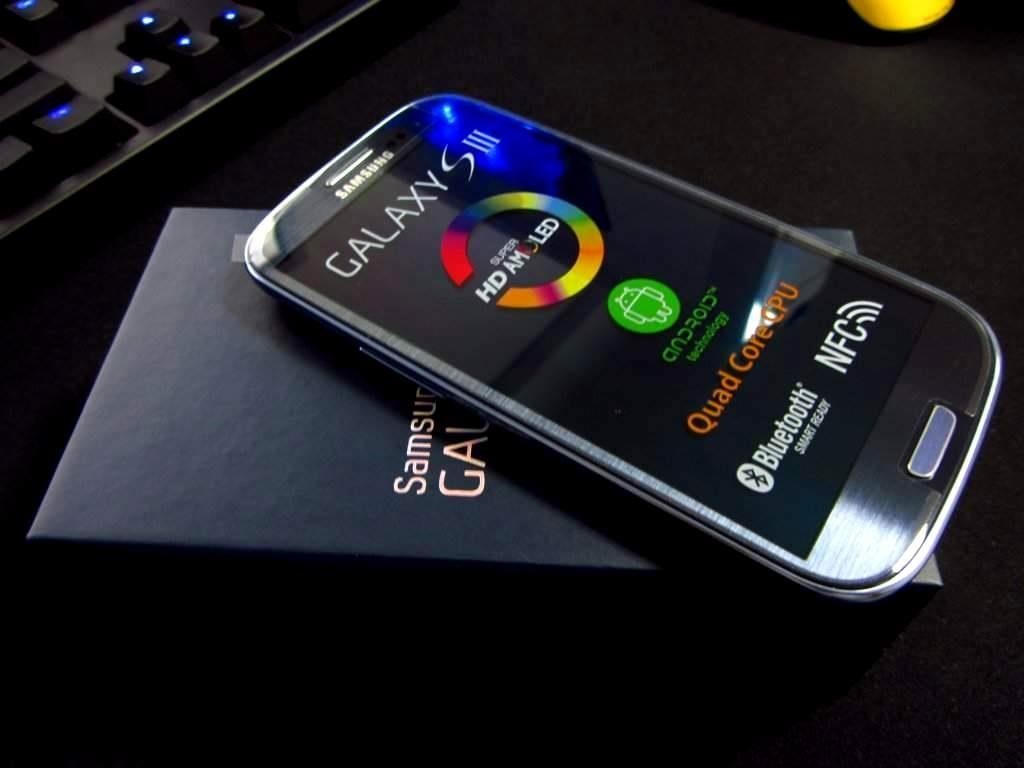
How to Network Unlock Your Samsung Galaxy S3 to Use with Another GSM Carrier

How to Network Unlock Your Samsung Galaxy S3 to Use with Another GSM Carrier


Why unlock your Samsung Galaxy S3 to use with a different SIM card? One possible reason is that you love your phone, but not your cellular provider because of the poor service or an unreliable connection. If you purchased a Samsung GS3 with AT&T, T-Mobile, etc. on a contract, it might be locked for a specific amount of time called the contract period.
After the contract period, you may request your network provider to unlock your phone, but it's not as easy to unlock as you think. In the U.S., unlocking became illegal after January 26th, 2013. However, a new bill is in progress to make it legal again.

To switch network providers, you need to first unlock your device. Many online websites or offline local stores can do it for a fee, but why pay if you can do it yourself?

How to Carrier Unlock Your Samsung Galaxy S3 Easily

Here's the step-by-step guide to show you how to quickly unlock your Galaxy S3, any model. If you have a newer Samsung Galaxy S4, check out these step-by-step instructions for SIM unlocking it.

Warning

Before start unlocking, make sure you have properly backed up your device. It's risky if you don't properly use the instructions or follow the steps one by one, so it's not my responsibility if something happens.

Step 1: Check Your Phone Version

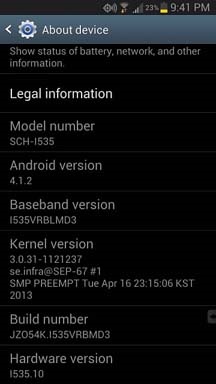
Your phone must be running on Android 4.1.1 or later to successfully use this method. Check your device Android version by opening the Settings menu, scroll to the bottom, and select "About Device" and check your phone's "Android version" number.

Step 2: Update Your Phone Version

If your phone is not updated to Android 4.1.1 or higher, you can do it by selecting the next menu to "About Device," select "System Updates," and then click on "Check for Updates." Your phone will automatically looked for the update over the network.

Step 3: Dial the Secret Code

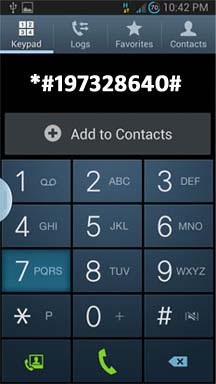
Open the dialer of your phone and enter the secret code *#197328640#—it will open the Service Mode Menu.

Step 4: Select UMTS Menu

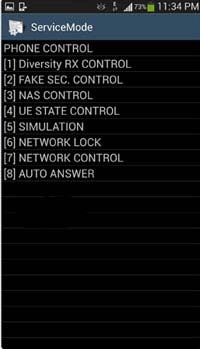
In the Service Mode Menu, select [1] UMTS. Tap the menu selection on you phone's screen to select it. If you select the wrong option by mistake, press the MENU button of your device and select back.

Step 5: Open the Debug Screen

In the menu under UMTS, select the [1] DEBUG SCREEN.

Step 6: Select Phone Control

In the Debug Screen, select [8] PHONE CONTROL.

Step 7: Select Network Lock

In the Phone Control Menu Screen, select [6] NETWORK LOCK.

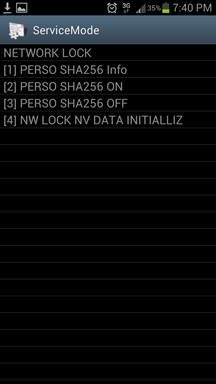
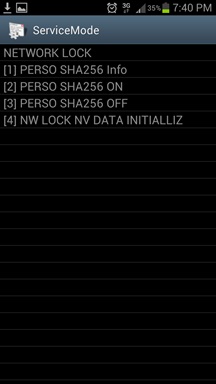
Step 8: Select Perso SHA256 Off

In the Network Lock Screen, select [3] PERSO SHA256 OFF and wait for 30 seconds. Then press the Menu button and select back.

Step 9: Choose NW Lock NV Data INITIALLIZ

After going to back to main menu, select [4] NW Lock NV Data INITIALLIZ.

Step 10: Backup & Reboot Phone

Once you select NW Lock NV Data INITIALLIZ, kindly wait for almost one minute and then reboot your phone. Note you didn't receive any confirmation for the process.

Insert the New SIM Card

Insert the non-accepted SIM Card and power on the Phone. If your phone didn't ask for Unlock Code, it's permanently unlocked to use with any GSM carrier.
You may have to downgrade your firmware version in order to let this method work. alternatively you can call your service provider and ask them for SIM unlock code without paying from your wallet. The only catch is that each service provider has few criteria which must be met before they give the unlock code for your device.
If you do not meet the criteria required by your service provider, a third-party SIM unlock service for your Galaxy S3 is your only other option. Please note sometimes your device may need hard reset to perform unlocking.

Friday, July 18, 2014

How To Edit Modify Android Apps .Apk Full Solution

hello everyone... I want to share the tool for editing apk, and making a slightly guide for decompile/recompile apk and basic editing xml/smali... and this guide and tool for Windows user...


REQUIREMENTS :

Download and Install on your computer

1. JDK here

2. 7zip here or Winrar (recommended) here

3. Notepad++ here

4. Android SDK for patch 9.png until Zipalign the apk here

5. Apktool & baksmali/smali + Signer for all GB/ICS/JB ROM here

6. Apktool & baksmali/smali + Signer for all GB/ICS/JB ROM v2 here

7. Apktool & baksmali/smali + Signer for all GB/ICS/JB/KK ROM v3 (4.4 Kitkat support/optimized) here


Save or extract apktool to folder directory :

Windows XP : C:\Document and Settings\folder your computer name\here

Windows 7 : C:\User\folder your computer name\here


CREDITS & BIG THANKS TO :

- Brut.all for apktool
- Team Reject for Quick baksmali/smali file
- Yorzua for Sign apk file
- Rizal Lovins for support me
- pantrif13


1. How to Decompile and Recompile *.jar file or classes.dex


- Copy *.jar file to apktool folder (make sure is the same folder). for example : android.policy.jar

- Open android.policy.jar using Winrar or 7zip and extract classes.dex file

- Drag & drop classes.dex to Quick-Baksmali.cmd (decompile process)

Screenshot example for Baksmaling/decompile classes.dex using drag & drop method :


- wait and you will see a folder with the name "classout"

- now you can start editing smali file on classout folder (use Notepad++ for editing it)

- After editing is complete, Drag & drop classout folder to Quick-Smali.cmd (recompile process)

Screenshot example for Smaling/recompile classout folder using drag & drop method :


- After recompile is complete, there will be a file with a name "new-classes.dex"

- Open android.policy.jar using Winrar or 7zip

- Rename new-classes.dex to classes.dex, and Drag & drop to android.policy.jar with normal compression

- finally, push back android.policy.jar into the system your device. push manual using root explorer/similar application or make a flashable zip.


2. How to Decompile and Recompile *.apk file


a. Copy framework-res.apk to apktool folder (make sure is the same folder).
(Attention : to edit other default apk on system/app like Contacts.apk, Phone.apk. MusicPlayer.apk etc.. needed framework 2.for example : twframework-res.apk)

b. Copy other *.apk you want to edit to apktool folder. for example : GreenRockers.apk

c. Open Command Prompt.bat

d. Decompile and install framework

Code:
apktool if framework-res.apk
apktool d GreenRockers.apk
Screenshot example for installing framework and decompiling apk :


if your apk is Contacs.apk, Phone.apk, Camera.apk etc.. follow this guide :

Code:
apktool if framework-res.apk
apktool if twframework-res.apk
apktool d Settings.apk
Screenshot example for installing framework 2 and decompiling apk :


e. wait and you will see a folder with the name "GreenRockers or Settings"

f. now you can start editing png, xml, even smali file

g. After editing is complete, Now Recompile

Code:
apktool b -f -d GreenRockers
or 

Code:
apktool b -f -d Settings
Screenshot example for decompiling dan recompiling apk :


h. After recompile is complete, go to GreenRockers or Settings folder, Open dist folder and open GreenRockers.apk or Settings.apk using Winrar/7zip

i. Open Original GreenRockers.apk or Settings.apk Using Winrar/7zip

j. Drag & drop META-INF folder and android.manifest.xml (if you not edit android.manifest.xml), also lib folder if there in Original GreenRockers.apk to Modified GreenRockers.apk or Modified Settings.apk on dist folder.

Screenshot example for Drag & drop META-INF folder etc :


k. Now Sign apk, example :

Code:
java -jar SignApk.jar testkey.x509.pem testkey.pk8 GreenRockers.apk GreenRockers_signed.apk
(Attention : Sign apk is only for 3rd Party apps, you can sign apk from system/app. but not all apk on system/app support)

l. Rename GreenRockers_signed.apk to GreenRockers.apk

m. Zipalign the apk

Code:
zipalign -fv 4 GreenRockers.apk GreenRockers-new.apk
n. Rename GreenRockers-new.apk to GreenRockers.apk

o. finally, push back xxxxxx.apk into the system your device. push manual using root explorer/similar application or make a flashable zip.


3. How to Zipalign the *.apk


1. Download and Install Android SDK (if you've downloaded, do not need to download again)

2. Go to C:\Program Files\Android\android-sdk\tools

3. Search + copy zipalign.exe and draw9patch.bat then paste in the c:\windows\here

4. Open cmd and typing this code (For example : Zipalign SystemUI.apk) :

Code:
zipalign -fv 4 SystemUI.apk SystemUI-new.apk

Saturday, July 12, 2014

Friday, May 23, 2014

List of Android "Secret" Codes, Tips, and Tricks

As pointed out from comments these are mostly for Samsung, I have added some for HTC below. Like I said this is just a start we can build form it. If anyone would like to create a Google Doc from this information please feel free I will add a link to this post.


SAMSUNG CODES
CodeDescription
*#*#4636#*#*Display information about Phone, Battery and Usage statistics
*#*#7780#*#*Restting your phone to factory state-Only deletes application data and applications
*2767*3855#It's a complete wiping of your mobile also it reinstalls the phones firmware
*#*#34971539#*#*Shows completes information about the camera
*#*#7594#*#*Changing the power button behavior-Enables direct poweroff once the code enabled
*#*#273283*255*663282*#*#*For a quick backup to all your media files
*#*#197328640#*#*Enabling test mode for service activity
*#*#232339#*#* OR *#*#526#*#*Wireless Lan Tests
*#*#232338#*#*Displays Wi-Fi Mac-address
*#*#1472365#*#*For a quick GPS test
*#*#1575#*#*A Different type GPS test
*#*#0283#*#*Packet Loopback test
*#*#0*#*#*LCD display test
*#*#0673#*#* OR *#*#0289#*#*Audio test
*#*#0842#*#*Vibration and Backlight test
*#*#2663#*#*Displays touch-screen version
*#*#2664#*#*Touch-Screen test
*#*#0588#*#*Proximity sensor test
*#*#3264#*#*Ram version
*#*#232331#*#*Bluetooth test
*#*#7262626#*#*Field test
*#*#232337#*#Displays bluetooth device address
*#*#8255#*#*For Google Talk service monitoring
*#*#4986*2650468#*#*PDA, Phone, Hardware, RF Call Date firmware info
*#*#1234#*#*PDA and Phone firmware info
*#*#1111#*#*FTA Software version
*#*#2222#*#*FTA Hardware verion
*#*#44336#*#*Displays Build time and change list number
*#06#Displsys IMEI number
*#*#8351#*#*Enables voice dialing logging mode
*#*#8350#*#*Disables voice dialing logging mode
##778 (+call)Brings up Epst menu
HTC CODES
CodeDescription
*#*#3424#*#*HTC function test Program.
*#*#4636#*#*HTC Info menu
*#*#8255#*#*launching GTalk Service Monitor
##3424#Diagnostic mode.
##3282#for EPST.
##8626337#for VOCODER
##33284#Field trial menu.
##786#Reverse Logistics Support.
##7738#Protocol Revision.
##775#Unknown
##2539#Unknown
CodeDescription
*#1234#to check software version of phone.
*#12580*369#to check software and hardware information.
*#0228#Battery status (ADC, RSSI reading)
*#0011#Service Menu
*#0283#loopback test
*#06#imei
*#03#nandflashheaderread
*#0808#usb service
*#9090#service mode
*#7284#FactoryKeystring
*#34971539#camera firmware standard
*#1111#servicemode
*#0*#Testmodus
CodeDescription
*#*#4636#*#*Display information about Phone, Battery and Usage statistics
*#*#7780#*#*Resetting your phone to factory state-Only deletes application data and applications
*2767*3855#It's a complete wiping of your mobile also it reinstalls the phones firmware
*#*#34971539#*#*Shows completes information about the camera
*#*#7594#*#*Changing the power button behavior-Enables direct poweroff once the code enabled
*#*#273283*255*663282*#*#*For a quick backup to all your media files
*#*#197328640#*#*Enabling test mode for service activity
*#*#232339#*#* OR *#*#526#*#*Wireless Lan Tests
*#*#232338#*#*Displays Wi-Fi Mac-address
*#*#1472365#*#*For a quick GPS test
*#*#1575#*#*A Different type GPS test
*#*#0283#*#*Packet Loopback test
*#*#0*#*#*LCD display test
*#*#0673#*#* OR *#*#0289#*#*Audio test
*#*#0842#*#*Vibration and Backlight test
*#*#2663#*#*Displays touch-screen version
*#*#2664#*#*Touch-Screen test
*#*#0588#*#*Proximity sensor test
*#*#3264#*#*Ram version
*#*#232331#*#*Bluetooth test
*#*#7262626#*#*Field test
*#*#232337#*#*Displays bluetooth device address
*#*#8255#*#*For Google Talk service monitoring
*#*#4986*2650468#*#*PDA, Phone, Hardware, RF Call Date firmware info
*#*#1234#*#*PDA and Phone firmware info
*#*#1111#*#*FTA Software version
*#*#2222#*#*FTA Hardware verion
*#*#44336#*#*Displays Build time and change list number
*#06#Displsys IMEI number
*#*#8351#*#*Enables voice dialing logging mode
*#*#8350#*#*Disables voice dialing logging mode
There, I fixed it

Blog Archive

increase adsense earning

Package
URL OR WEB ADDRESH

Live Traffic Feed